Rule Changes 2015
Surrey Hockey Umpire Association

What are the Rule Changes for 2015?
- Breaking at a penalty corner
- Two minute green card
- Use of the stick above the shoulder
- Long corner
- Re-start after the ball has been unintentionally played over the back-line by a defender (and no goal is scored)
- Free hits within 5m of the circle
- Up 10m rule
- Encouraging umpires to officiate to the rationale of new rules
- To encourage the fast pace of our game
- To allow play to flow more freely
Breaking at a Penalty Corner
- New Rule
- If a defender, other than the GK, breaks the line then they must go beyond the half-way line and cannot be replaced.
- If the GK (or kicking back) breaks the line, they do not have to go to half-way. In this case, the defence chooses which of the remaining players do.
- An attacker who breaks early into the circle is also sent to half-way. The PC is retaken.
- If the injector feints at playing the ball (or takes the mickey in some other way), then they are sent to half-way. Another attacker injects the re-taken PC.
- Rationale for the change
- To improve the flow of the game by reducing in the number of early breaks, by both attackers and defenders (but mostly defenders!)
Breaking at a Penalty Corner
- Application of the rule change
- If during the PC, another PC is given, any player already sent to half-way must stay there for the retaken penalty corner.
- If a subsequent defender breaks the line at a retaken penalty corner, then that defender is also be sent to half-way (except GK).
- ...
Breaking at a Penalty Corner
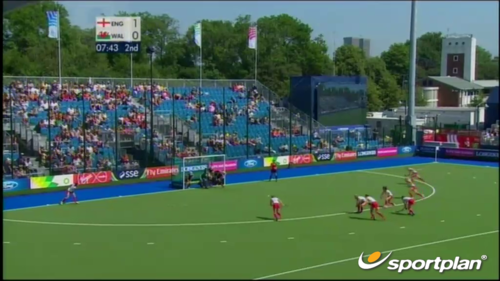
- Video 1
Vertical Slides
Slides can be nested inside of each other.
Use the Space key to navigate through all slides.

Basement Level 1
Nested slides are useful for adding additional detail underneath a high level horizontal slide.
Basement Level 2
That's it, time to go back up.
Slides
Not a coder? Not a problem. There's a fully-featured visual editor for authoring these, try it out at http://slides.com.
Point of View
Press ESC to enter the slide overview.
Hold down alt and click on any element to zoom in on it using zoom.js. Alt + click anywhere to zoom back out.
Touch Optimized
Presentations look great on touch devices, like mobile phones and tablets. Simply swipe through your slides.
Fragments
Hit the next arrow...
... to step through ...
... a fragmented slide.
Fragment Styles
There's different types of fragments, like:
grow
shrink
fade-out
current-visible
highlight-red
highlight-blue
Transition Styles
You can select from different transitions, like:
None -
Fade -
Slide -
Convex -
Concave -
Zoom
Themes
reveal.js comes with a few themes built in:
Black (default) -
White -
League -
Sky -
Beige -
Simple
Serif -
Blood -
Night -
Moon -
Solarized
Slide Backgrounds
Set data-background="#dddddd" on a slide to change the background color. All CSS color formats are supported.
Image Backgrounds
<section data-background="image.png">Tiled Backgrounds
<section data-background="image.png" data-background-repeat="repeat" data-background-size="100px">Video Backgrounds
<section data-background-video="video.mp4,video.webm">... and GIFs!
Background Transitions
Different background transitions are available via the backgroundTransition option. This one's called "zoom".
Reveal.configure({ backgroundTransition: 'zoom' })Background Transitions
You can override background transitions per-slide.
<section data-background-transition="zoom">Pretty Code
function linkify( selector ) {
  if( supports3DTransforms ) {

    var nodes = document.querySelectorAll( selector );

    for( var i = 0, len = nodes.length; i < len; i++ ) {
      var node = nodes[i];

      if( !node.className ) {
        node.className += ' roll';
      }
    }
  }
}
Code syntax highlighting courtesy of highlight.js.
Marvelous List
- No order here
- Or here
- Or here
- Or here
Fantastic Ordered List
- One is smaller than...
- Two is smaller than...
- Three!
Tabular Tables
| Item | Value | Quantity |
|---|---|---|
| Apples | $1 | 7 |
| Lemonade | $2 | 18 |
| Bread | $3 | 2 |
Clever Quotes
These guys come in two forms, inline:
“The nice thing about standards is that there are so many to choose from”
and block:
“For years there has been a theory that millions of monkeys typing at random on millions of typewriters would reproduce the entire works of Shakespeare. The Internet has proven this theory to be untrue.”
Intergalactic Interconnections
You can link between slides internally, like this.
Speaker View
There's a speaker view. It includes a timer, preview of the upcoming slide as well as your speaker notes.
Press the S key to try it out.
Export to PDF
Presentations can be exported to PDF, here's an example:
Global State
Set data-state="something" on a slide and "something"
will be added as a class to the document element when the slide is open. This lets you
apply broader style changes, like switching the page background.
State Events
Additionally custom events can be triggered on a per slide basis by binding to the data-state name.
Reveal.addEventListener( 'customevent', function() {
	console.log( '"customevent" has fired' );
} );
Take a Moment
Press B or . on your keyboard to pause the presentation. This is helpful when you're on stage and want to take distracting slides off the screen.
Much more
- Right-to-left support
- Extensive JavaScript API
- Auto-progression
- Parallax backgrounds
- Custom keyboard bindings